If you follow the developments in the world of smart phones, watches and tablet computers then you know that the rumors are often true. See how it will probably look like the Samsung Galaxy Note 5!
It is clear that the new Galaxy Note 5 will launch in September 2015, possibly with curved 4K screen to flanks. Already, an artist who specializes in creating concepts upcoming leading phone provided us an opportunity to take a look at how it might look like the next Galaxy S phone.
The concept of the video from the site Note5Galaxy.com displays Galaxy Note 5 with a design that is more borrowed from the Galaxy 4 phones than the Galaxy S6. Unlike previous phone notes, this video shows that the Note 5 could be packaged in an aluminum chassis.
We believe that you are all one so far been in a situation that you have no idea where you left your cell-phone. You searched under the seat in the car, raised all the pillows on the couch ... and you have not found it? Google has a solution for you.
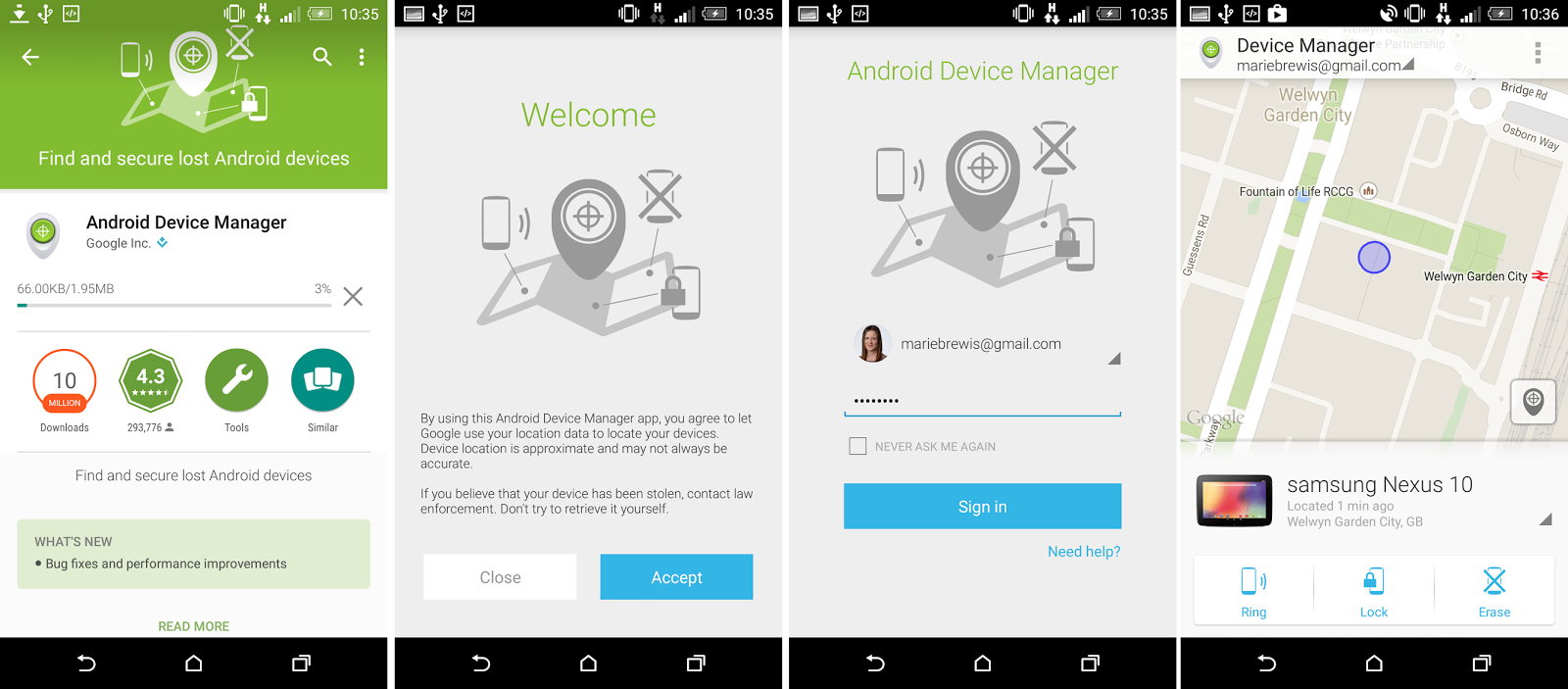
Application Find My Phone (Android Device Manager) will help you if you can not find your phone.
Google has introduced a new feature that helps Android users to locate your favorite device, all you need is a computer.
If the mobile is in the vicinity, you will discover where he is due to ringing or its location, you can see on the map if you have, for example, forgotten in a bar.
This new option is simply called "Find My Phone" allows users to Google's search engine type "Find My Phone" and use it.
For an application to work properly, users must ensure that they use the latest version installed on a portable device and at the same time are in your Google account on both the mobile and the computer. Then they will just appear on the map indicating the location.
If you suspect it was stolen If you are, you think that your device is stolen, users can lock the mobile via Android Device Manager, erase the data on it or change the password.
If you are a person that the Android device performs multiple operations at once, or if you are a multitasking person, PinTasking is a great help for your fingers and brains! Read and see how this app can help you! The past decade has not only the past decades as digital elevations, as decades of self photos or decades ephemeral generation, it is well known that the past decade was marked by multitasking. When using a smart phone, you are not focused on one thing. In fact, most of us at the same time perform multiple operations where we were active in the background a minimum of five applications. For now widely known application that is used to view the active application is just one that is integrated into the I Android (recent menu).
Perhaps for someone who is not used often multitasking recent menu quite adequate tool, but what is the situation in other circumstances? For users who at one time performed more operations, using five or more applications, recent menu is simply inadequate. Then, although it is still in beta, PinTasking takes control of the situation.
The main idea of the application is to preserve and to provide quick and easy access to recently the usable application, document, or web site. With the gesture of a finger across the screen, the user is able to mark what it often wants to access. When the time comes to access to documents or applications labeled website, it is enough to touch a floating key for switching. The application has PinTasking range of options and functions that will be useful and allow for fluid movement between active applications. The user is able to modify the behavior and appearance of floating keys, and even its size.
To most easily realized the possibilities of this fabulous application we suggest that you look at the attached video material and also see how it is used:
Although PinTasking in beta, already has apps material design look and great features, but it would be good to say that the notes that the "hiccups" in the work. To use PinTasking it is essential that you assign access to the root and to have 5 LolliPop Android platform. PinTasking Pro BETA version is free until May 11. Do not wait more and more immediately download the attached link:
>>>PinTasking<<< If you are not root-ovals phone here's how to do it:
Some owners of Nexus 10 Android tablet began to receive OTA (over the air) update to Android 5.1.1 version of Lollipop. Users report that this is a small apdektu size 13,9MB. Updating slowly comes to devices, so that at the moment they do not see all users Nexus 10 tablet.
It is expected that with this comes Updates more than the usual stability and performance improvements, and bug fixes. This update marks the Nexus 10 tablet as one of the first Nexus devices get Android 5.1.1 Lollipop. Google recently enabled Android 5.1.1 Lollipop factory settings for the Nexus 7 2012 and 2013 as well as the Nexus 10 tablet.
See how to root your Android device caught by Kingo Root program in a few steps. Root is a term used to express the modified state of Android devices. When the phone is root-ram, this means that the Android phone is unlocked and open to modification of system files. What are the benefits Root? More visible examples of the application with additional options that are available only if you have access to the root. Let's say you have a root-ram device, you can easily delete system applications that are not required.
Again, the question is "how to root your phone?" Initially, the root-ing was very complicated and there was no procedure in a few clicks. Root worked by advanced users of the Android platform, and in the beginning of the root was the trademark of programmers. Today, root is inevitable and it is a process that can be done even beginners. With the help of the program that is installed on the computer, users of Android without problems can root your phone.
Follow these steps to root your phone: 1. With this link download desktop applicationandroid_root click on the green button "download".
2. After clicking on the button "Download" will open a new page where the download will be started. Also, on this page you will have illustrated instruction on how to start the installation program "Kingo Root".
3. Double-start the installation without concern has come to an end clicks on the "Next" and "Install". As part of the installation are not conditioned by the toolbar-this or similar additional applications.
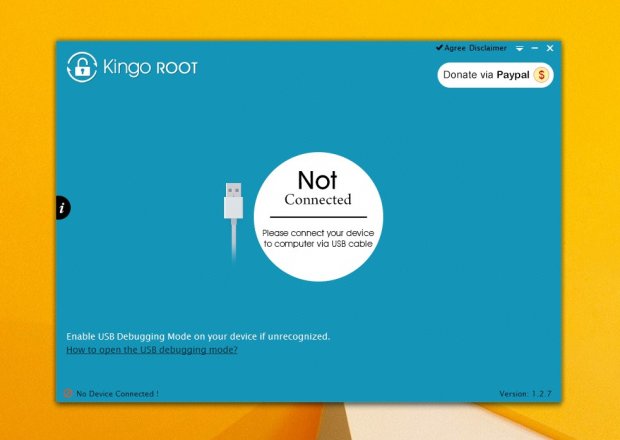
4.Start program to get you started root. On the home page you will notice that there is a notice in the lower left corner, which says it is necessary to have a check mark for the "USB debugging" ie. "USB debugging".
5. To activate this option, click on the attached link "how to open the USB debugging mode?" Under the "Kingo Root".
6. Connect your phone to the computer with a USB cable and wait for the computer downloads and installs the necessary drivers.
7. When connected, the driver installation and successful communication with a computer phone, "Kingo Root" will automatically switch to the next step which informs you that the root violates the guarantee but allows installation of recovery, the ROM and the applications that the root -RAM phones they have more options.
8. At the bottom of the window you have the "Root", click on it and start the root-ing.
9. When the "Kingo Root" complete its work there will appear the notice "Root Succeeded" button at the bottom and "Finish". Clicking on this button will reset the phone and so complete root
This is the simplest root that exists. This way you can root and tablet devices.
You will not believe how good applications spinning out of Google Play Store! Here you have the best apps, where they can download and how to install them.
Best Android platform is the possibility that you can download many different applications from Google Play store. Again, on the other hand, the potential of the Android platform does not end there. As most know, the internet is turning a bunch of applications that can not be found on the Google Play store. What's more, these applications are often the best.
Today, we have prepared a list of the best applications that can not be found on the Google Play store. We have attached to you and links from which you can download and install. Before we continue please note that the requirement to install applications from the phone memory check mark option "unknown sources" (settings>More>Security>¨mark¨unknown sources)
Adobe Flash Player 11.1
Devices powered by Android 4.4.1 and above, supporting the installation of Flash Player despite the fact that it is not officially supported by the Google company. The internet is still a lot of websites that use Flash integration, if you want them to visit and review the content with them, you need to have Flash Player.
On the Google Play store, there are many applications that promise that if you download them you can watch movies on your phone via the Internet. A few of them even offers a translation into many languages, however we were unable to find even one that really worth. This does not mean that there is no way to watch movies, this means that you should not application looking at the Google Play store.
I do not know if you've heard of "Popcorn Time" if you're not then it's time to be impressed! As most applications that violate copyright Popcorn can not be downloaded from the Google Play Store but can on their website.
Download the app to your phone with this LINK Kody - XBMC
Formerly known by the name of Xbox Media Center (XBMC) now under the name "Kody," a media entertainment center, which greatly resembles Netflix or Hulu. You are able to access video, music, images from the Internet and from your phone memory.
Kody is compatible with Windows computers, so it is very easy and you can use on larger screens. In these situations, Android becomes a remote control that lets you start, stop, or change the content on the computer.
WhatsApp + is perhaps the biggest hit of all applications outside Google Play network! This is a modified version of WhatsApp application that offers some interesting additions: the ability to change the size of files that you send, send photos in full resolution and the possibility of concealing your online status.
Other interesting aspects of WhatsApp + applications have the ability to send music contents By the use of a wider range of emoticons, advanced widget and setting themes and icons for adaptation WhatsApp application to your liking. Also please note only that before installing WhatsApp + applications necessary to delete the official version if you on the phone.
TubeMate This is an application that is known to many people and especially the followers of our YouTube channel. It was a hit because it allows smooth download videos from YouTube in a format that suits you. We believe that you will be delighted when you sample application, so refer to the attached video to download it.
CyanogenMod installer for a short time in the Google Play store until two weeks later were not "kicked about" or kicked. The reason is that the ejection Google cited "user guidance to undermine the guarantee for the sake of using CyanogenMod Installer" This application has not lost popularity even after kicking because it is a practical tool for auto-install CyanogenMod on all supported phones.
Here's another application that is very interesting, but in contrast to Gravity Box does not require root. The application offers a popup panel interesting shapes with various abbreviations and useful information.
To access this pane, simply drag your finger from the edge of the screen towards the center. The panel can be modified so that you can add features and shortcuts to suit you.
We are sure that you are familiar with the battle between Apple, Samsung and HTC by company, which even leads through ad! This time HTC has really disgraced Apple and Samsug, look! It is known that HTC, Apple and Samsung for a long time "jockeying" by commercials and sketches. This advertisement we want to show you now is practically left Samsung and Apple "speechless"
In his advertisement HTC has stated that the use of Apple and Samsung phone creates "disorder unpleasant using the phone," and iPhone as "an operating system that irritates the body of users".