For $199, we wouldn’t be surprised if your expectations for build quality on the honor 5X weren’t very high, but Huawei did manage to put together a beautiful looking and feeling device for such a low price point. But can it handle anything more than delicate care? That’s what these bend, scratch and burn tests are for. Jerry Rig is back with his standard torture test. The Honor 5X surprisingly does well in all 3 categories. The glass isn’t easily scratched except for using highly-sharp objects, though the aluminum nature of the device is naturally susceptible to light scratching from keys. The burn test didn’t seem to destroy any pixels on the display.
And as for the bending, while it can flex ever-so-slightly (and only under extreme pressure), it won’t snap in half like a toothpick like the Huawei Nexus 6P did.
All in all? A solid outing for a phone that only costs you $199. Bonus points for it being a pretty capable phone in terms of brawn, too. Check out the video below.
Huawei unveiled the Huawei Mate 8 at its press conference in Las Vegas today. Despite the phone being available in China since December, it will now see a global launch, as long as you consider “global” as anywhere outside the United States. The phone features a 6-inch display and runs on Huawei’s own Kirin 950 octa-core processor. According to Huawei, this new processor should boost performance 100 percent over the previous version, with GPU performance seeing a 125 percent boost.
The camera features a 16MP rear-camera, with a Sony IMX298 sensor. The front-facing camera is an 8MP front-facing camera with what Huawei calls a “beauty algorithm”, which is supposed to make taking gorgeous selfies effortless.
Huawei also made sure to mention the phone’s 4,000mAh battery should be able to last two days on a charge with only a 30-minute charge session providing a full day’s worth of battery power.
Here’s the quick and dirty on the specs for the phone, which comes in four colors, including champagne gold, moonlight silver, space grey, and mocha brown.
Display: 6″ 1920x1080p LCD screen (368ppi)
Operating System: Android 6.0
Processor: HiSilicon Kirin 950
Storage: 32GB/64GB/128GB
Memory: 3G RAM for 32GB model / 4GB RAM for 64GB/128GB
Camera: 16MP rear camera / 8MP front-facing camera
Battery: 4000mAh battery
Connectivity: Wi-Fi 802.11 a/b/g/n/ac, Bluetooth 4.2
We found it odd that Huawei would take the opportunity to announce a flagship device like this at US trade show, versus something more internationally centered like Mobile World Congress. No word on when, or even if, we’ll see the Huawei Mate 8 launching here in the US, but we suppose that could be reserved exclusively for Huawei’s budget “honor” line.
Whatever the motivations behind it, the current trend in mobile seems to be devices that are increasingly growing thinner every year. While that’s great for bragging rights, the problem is this sometimes comes at the cost of battery capacity. Sure we have more power efficient processor to tackle this, but at the end of the day they still need mAh to make them tick. Attacking the battery life issue from a different angle are advancements to how quickly our smartphones and tablets fully charge. We know Qualcomm has Quick Charge 3.0 on the way (capable of going 0-80% battery in only 30 minutes), but new tech from Huawei looks to beat even that. By a lot.
Announced on the Huawei Fans Club Blog, Huawei’s Watt Lab showed off a new kind of lithium-ion battery that can charge 10 times faster than those other guys. Using heteroatoms they bonded to the molecule of graphite in anode — which offer increased charging speeds without a decrease in energy density or battery life — Huawei was able to charge a 3,000mAh battery (620 Wh/L energy density) to 48% in only 5 minutes, which allowed for ten hours of call time. Don’t believe them? There’s of a video of it in action here. There was also a smaller 600mAh battery that could hit 68% in only 2 minutes, more suited for smaller devices like wearables.
Huawei believes their breakthrough could lead to a “revolution” in electronics devices like smartphones, wearables, mobile power supplies, and even electric vehicles. It seems every few months we read about some new advancement in battery tech, only to find it’s not really well-suited for consumers devices. There’s no telling when Huawei’s new battery life will hit market (if ever), but it’s an exciting breakthrough none-the-less.
Although we were a bit skeptical at first, after receiving the Nexus 6P last week and playing around with it non-stop since then we can conclude, without a shadow of a doubt: the Nexus 6P isn’t just the best Nexus device, it’s arguably the best Android device to come along in years. If you’re a new owner, we probably don’t need to tell you that.
One thing we did want to discuss, whether you just received the Nexus 6P or it’s still coming in the mail, are the first things every owner should do. Although the following guide is more geared to the new or casual Android user (please feel free to share with your non-tech savvy friends/family), we think veterans might find something useful as well. Here are the first 11 things every Nexus 6P owner should do.
1. Use the included power adapter whenever possible
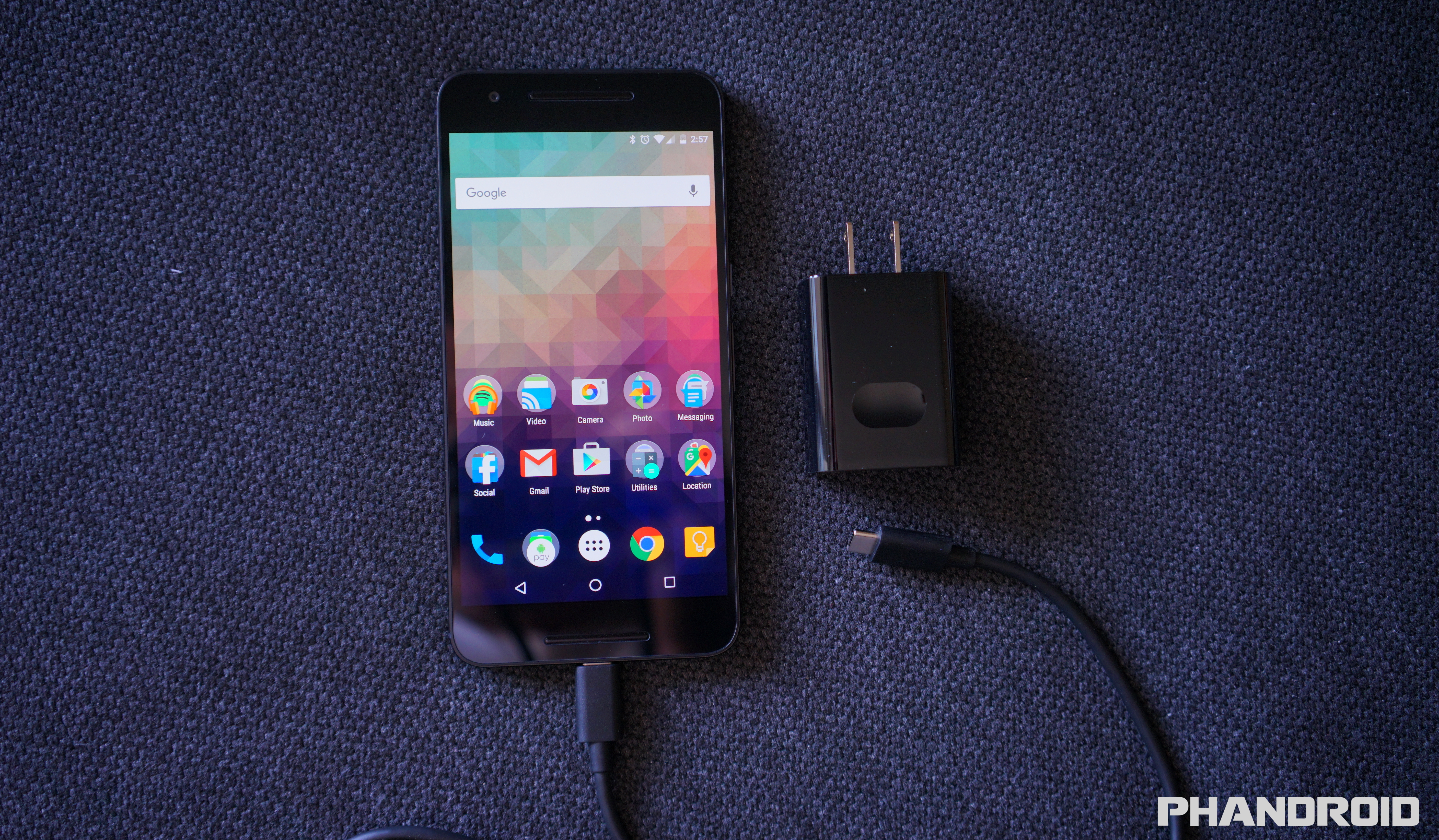
Although the Nexus 6P doesn’t technically support Qualcomm’s “Quick Charge 2.0,” the 6P does have its own fast charging tech. Google says you can get 7 hours of usage out of a 10 minute charge, but there is a catch: you’re going to have to use the included wall charger, not some rink-a-dink wall charger you found at the 99 Cent Store.
Because of the phone requires a very specific type of charge (5V/3A), finding additional 3rd party options can be kind of tough. Should you be looking for a spare, you can always buy an official Nexus 6P charger from the Google Store — in single or dual-port varieties — although at $25 and $40, respectively, they’re a bit pricey.
Of course, you can always experiment with whatever charger you have laying around and the include 6-inch Type-C to Type A cable (good luck), just know that it probably wont charge as quickly even when the the Nexus 6P lock screen shows that it’s “fast charging.”
2. Sign into your Google account and restore select apps/games
Okay, so this one is pretty much a given. To enjoy just all the free and paid apps/games on the Google Play Store, you’ll need to sign into a Google account. There are a few options Google will give you during the initial setup process, one of which is called Tap & Go. All it does is copy your Google account sign-in info from another (NFC equipped) Android device by pressing the back of them together. It’s neat if you have your old device handy, just make sure it has NFC or it wont do anything. Of course you could always manually type in your sign-in info…
Once you’re all signed in, Google will allow you to choose a previous phone you’d like to copy apps from (either all of them, or just specific apps/games). Depending on the amount of apps you’re restoring, it could take a good 10 minutes, so now would be a good time to make a sandwich. Keep in mind, this wont restore everything, but you should have all your Google contacts moved over followed by the mass re-downloading of all your apps from the Google Play Store. We recommend connecting to WiFi for the quickest results.
3. Secure your phone with fingerprints, pattern, PIN, or password
Our smartphones carry a lot of sensitive information inside, information you probably don’t want ending up in the wrong hands. Should you ever find yourself leaving your phone in a cab, restaurant or even a friends/family place, you’re probably going to want to lock it down with a secure lock screen lest you have someone snooping inside.
The great part about Android is there are a few options available to you — pattern, PIN, and password — and no matter which method you choose, it’s always better than nothing. Because the Nexus 6P also has a fingerprint sensor that can unlock the phone (also known as “Nexus Imprint”) chances are you’ll rarely have to use any of the above methods (as they’re only for backup), but you will be forced to pick one.
If you really want extra security and render your phone useless in the hands of a thief or new owner, you can even have your phone require a PIN before it even boots up. You know, to be on the extrasafe side. Then again, if the phone doesn’t boot, you wont be able to locate it if it gets lost or stolen. Just a thought.
You probably already came across the “Protect your phone” process during the initial setup, but in case you skipped over it, here’s how you can quickly secure your phone later:
1.Go to Settings app > Security. 2.Tap on Nexus Imprint. 3.Choose a secure screen lock from the list (pattern, PIN, or password). 4.Decide whether you want enable “Secure startup” (not recommended for most people). 5.Create a pattern/PIN/password. 6.Decide whether to show full notification content on lock screen, only the app it came from, or nothing at all. 7.Add fingerprints using the Nexus Imprint sensor on the back of the phone. 8.Press the sensor 6 times to record fingerprint data.
That’s it! We recommend adding additional fingerprints using the same index finger twice, but in a slightly different position each time for better accuracy when unlocking using Nexus Imprint. For instance, the first time place your finger flat on the sensor for the first fingerprint. Then, add another using the same finger, but this time use the tip or side of your finger to touch the sensor. This way, no matter how you press your finger on the sensor, you’ll get an accurate reading. Google says recorded fingerprints are encrypted and never leave the actual device, so don’t worry about them being uploaded to the cloud somewhere.
4. Use your fingerprint to make purchases on Google Play
Android isn’t nearly as annoying as iOS is when it comes to downloading free apps. Although you wont be asked for your password when downloading free apps and games, you’ll more than likely reach a point where you actually want to buy something. Entering passwords can be annoying, especially if you have potato fingers like mine. Thankfully, in Android 6.0 Marshmallow, you can now make purchases using Nexus Imprint. You can enable it only 3 easy steps:
1.Open the Google Play app. 2.Slide out the navigation drawer and select Settings. 3.Scroll down and check the box for Fingerprint authentication.
Now, the first time you make a purchase on the Play Store it will still ask for your password, but everything after that can be bought using your fingerprint. You can also skip all that and simply select the option to “Use fingerprint for future purchases” when buying something. Keep in mind that however you enable it, you’ll still have to enter your password the first time, but from here on out, it’s all fingerprints.
5. Use Smart Lock to keep phone unlocked when at home or connected to your smartwatch
Even though Nexus Imprint is more convenient than having to enter a pattern/PIN/password every time you unlock your phone, it can still be a nuisance. For instance, when you have the phone laying on a desk and just want to check on something really quick. Or perhaps you just got home from a long day at the office and don’t want to have to bother using your fingerprint every time you need to check in with your city on Clash of Clans.
Because this is Android we’re talking about here, you have other options as well. Like your phone automatically removing the secure lock screen as soon as you walk through the door of your home. You can even set it so that it’s unlocked when it’s on your person, or say, connected to a Bluetooth device like your smartwatch, wireless speaker, or car stereo. Should you leave the phone in a restaurant, you’ll have the piece of mind of knowing that it automatically locked itself. Neat huh? Here’s where you’ll find it: Settings app > Security > Smart Lock (enter password/PIN/pattern). From there you’ll have a few options:
Trusted devices – keep your phone unlocked when connected to specific devices (speaker, car, smartwatch) via Bluetooth.
Trusted places – keep your phone unlocked when you arrive in specific places (home, work, etc.).
Trusted face – phone will automatically unlock when it recognizes your face after turning the screen on.
Trusted voice – unlock the phone using your voice.
6. Enable developer mode (to speed up animations)
There’s no denying the Nexus 6P is fast. In fact, it’s the fastest Android device we’ve ever laid our hands on. But we can do better. You can actually make the phone feel even zipper by speeding up the transition and UI animations. It’s hidden away inside the Developer options, but here’s how you can find them:
1.Open the Settings app. 2.Scroll down to the bottom and select About phone. 3.Scroll to the bottom and press Build number 7 times (you’ll see a confirmation that you are now a developer), press the back button. 4.Developer options will now appear at the bottom of Settings, select it. 5.Find window animation scale, transition animation scale, animator duration scale and select .5x for each.
7. Enable System UI tuner to add battery percentage
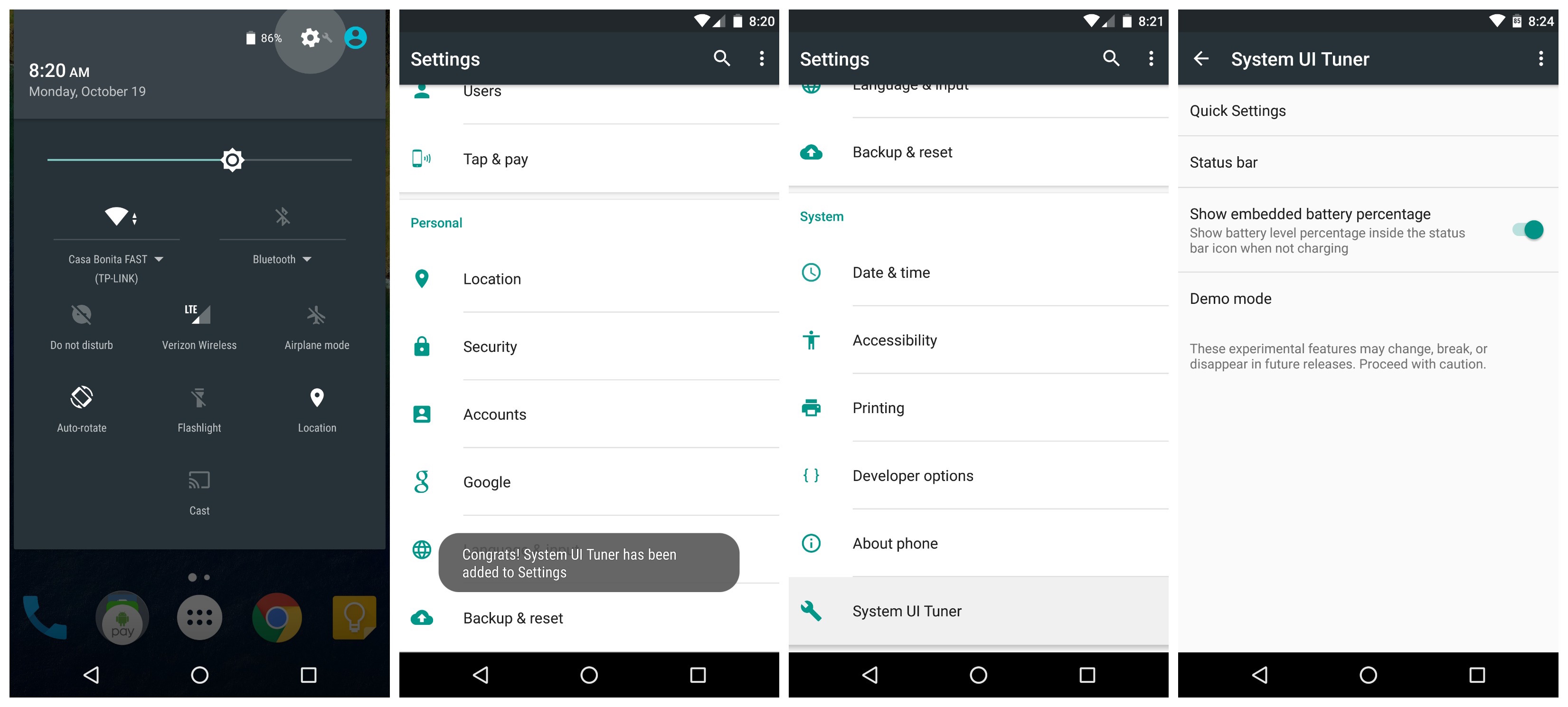
By now you’ve probably noticed how the battery icon in the status bar doesn’t display the actual battery percentage. If you’re looking for a little more detail, tucked away in Android 6.0 Marshmallow is another hidden setting called System UI Tuner. Why it’s hidden, nobody knows, but Google says it’s still “experimental.” Don’t worry, we’re not going to use it for much.
Just pull down the notification tray twice and long press on the little Settings gear icon for about 5+ seconds. It make take more than 1 attempt, but once you let go and pull the shade back up, you should see a new prompt telling you that “Congrats! System UI Tuner has been added to Settings.” Just like those Developer options, you’re going to scroll down to the bottom of the Settings app where you’ll find a new setting called System UI Tuner.
Once inside, Google will warn you about the features being experimental, just select “Got it” and “Show embedded battery percentage. After that, the battery icon in your status bar will show you a battery percentage. Easy peasy.
8. Enable Google Fit
Google Fit is pretty great for tracking general physical activity throughout the day. It’s not as incredibly in-depth as some other services, but the fact that it comes pre-installed on most Android devices and syncs your data to your Google account, you’ll probably want to use it. The only thing you need to do is open the app and enable it.
1.Open the Google Fit app. 2.Sign in with your Google account. 3.Fill out your height, weight, gender, and set a personal fitness goal.
Because the app runs in the background, you wont have to worry about opening it every day or messing around with it too much. Just make sure you keep your phone on you while you’re out and about running errands, or during your run. After that, you’ll receive the occasional notification when you’re getting close to, or have reached, your daily step/activity goal.
9. Setup Android Pay to make purchases using your smartphone
Whether you hate pulling out your wallet and swiping your credit card, or you simply want a backup method of paying for things should you leave your wallet at home, Android Pay makes it easy to make purchases using nothing but your smartphone. Like some of the other things on this list, you’ll first need to open the app and set it all up.
1.Open the Android Pay app on your phone. 2.Touch the + sign in the bottom-right corner. 3.Touch Add a credit or debit card. 4.If you already have linked cards, choose one or touch Add another card. 5.Use the camera to capture your card info or enter it manually.
The toughest part is finding a place that accepts Android Pay, but keep in mind it also works anywhere tap-to-pay or Apple Pay is accepted. Even then, not all card issuers are supported, but you can find a full list of Android Pay supported banks over here. Happy tapping!
10. Check out all the new Marshmallow features
Some of the Nexus 6P’s best features were actually introduced in Android 6.0 Marshmallow. It’s Google’s latest Android release and more than anything it polishes off some of Lollipop’s rough edges, while giving users more control of their apps, better battery life, and improved UI. We covered most of this in our “Everything New in Android Marshmallow” post from back in August, but in case you need a refresher, here’s some of the bigger things you should definitely try out:
1.Google Now on Tap – Scans entire screen to pull up relevant information in a Google Search. 2.Easy word selection and toolbar – Highlight text and a new copy/paste toolbar appears right above it. 3.Simplified volume controls – Adjust ringer/notification volume, media volume (music and videos), and alarm volume by click the drop down arrow. 4.Improved ‘Do Not Disturb’ mode – Choose between total silence (even alarms are muted), alarms only (everything but alarms are muted), and priority only (can be fine tuned to allow specific apps to still ring). 5.Greatly improved battery life while sleeping – With the new “Doze” feature, apps are frozen when the phone hasn’t been touched or moved for long periods of time, increasing standby battery life by days (yes, we said days). 6.App’s ask for permission to access device functions – Apps now ask permission before accessing things like your location, microphone, or camera. You can even fine tune this some more by manually toggling these permissions on the App Info page (Settings > Apps > select app > Permissions).
11. Explore the Nexus 6P forums
The best place for new Nexus 6P owners to mingle is on Android Forums. It’s where you’ll find all sorts of help, tips, tricks, support, suggestions, and information about your phone than shiny new smartphone. You’ll also find plenty of other users sharing their own personal experiences, favorite accessories, and whatever else pops into their head. Here are a few of the more popular threads to get you started:
Metal unibody, spacious 6.0-inch display, a super fast fingerprint reader and nice 13MP camera, the Huawei Mate7 is definitely a tough device to top. However, the Chinese OEM is definitely trying its best and the Mate 8 does look mightily impressive.
We have already seen a few leaks of the upcoming phablet, some of which even complete with photos. But, information about the already announced Mate S seemed to often get mixed into the leaks. A new source, however, now promises the full scoop on the device and its specs sheet. As previously thought, the Mate 8 will have a spacious 6.0 inch 1440p display and the OEM's new custom Kirin 950 chipset. It promises to deliver unprecedented power thanks to a 16nm FinFET production process and a big.LITTLE architecture. The four Cortex-A72 cores are clocked at 2.4 GHz, while the extra four Cortex-A53 ones run at 2.0 GHz and should easily top the Samsung Exynos 7420 and the Qualcomm Snapdragon 810.
The bundled GPU is also pretty impressive – the ARM Mali-T880 and it should also be joined by an i7 coprocessor and a Tensilica Hi-Fi 4 independent audio chip. A promising collection of silicon indeed. The rest of the specs sheet includes 3GB or 4GB of RAM, bundled with 32GB or 64GB of onboard storage, respectively.
A preliminary price tag is also know and it sound very attractive for such a high-end unit: CNY 3,299 ($520) for the 3GB one and CNY 3,899 ($610) for the more powerful one. As for availability the Huawei Mate 8 is still said to arrive before the end of the year, perhaps in late November or early December.
Google has made it all official, folks: this is the Nexus 6P by Huawei. There aren’t many surprises by now, but it’s nice to get an official rundown of everything this phone has to offer. It’s a 5.7-inch AMOLED display surrounded by a ton of metal and backed by a lot of processing power. Here is the full spec sheet for your consideration: Screen: 5.7”, 518 PPI, WQHD AMOLED Camera: 12.3MP Rear / 8MP Front (1.55 μM, F2.0 / 1.4 μM FF) Processor: Qualcomm® Snapdragon™ 810 v2.1 processor Battery: 3,450 mAh (Built-in) Dimensions: 159.4 x 77.8 x 7.3 Weight: 178g RAM: 3 GB (LPDDR4) Storage: Comes in 32/64/128 GB
You’ll notice there’s no wireless charging or microSD slot, but there’s plenty more to like here. The device features Nexus Imprint, which is a fancy name for that fingerprint scanner you see on the back. It can be used to authorize purchases from Google Play or in financial apps, as well as the ability to authorize Android Pay purchases.
The device also works with the new “Android Sensor Hub,” a low power mode which is always working to deliver context-sensitive functions. For instance, tapping the fingerprint scanner will bring the device from sleep to wake in no time — it’s nearly instantaneous. It also powers the ambient display mode, which — coupled with an awesome AMOLED display technology — makes it easy to jump in and out of notifications even while the display is powered off.
The Nexus 6P will obviously ship with Android 6.0 Marshmallow and all the features which come with that goodness (including Google Now on Tap). Google also confirmed that it’s fully compatible with all major US carriers, as well as most carriers in Canada and around Europe. Oh, and there’s Proect Fi support — can’t forget that. You can order one from the Google Store right now starting at $499 in Aluminium, Graphite, or Frost color options.
The Huawei Nexus has cropped up in another benchmark database, this one gives more detail about the upcoming Google phablet. GFX Bench 3.1 detected 5.7" screen with QHD resolution (1,440 x 2,560px).
The chipset is the expected Snapdragon 810 with 3GB of RAM and 32GB of storage. It will be running Android 6.0 Marshmallow, naturally.
The main camera is only a 12MP shooter with 2160p video, nothing extravagant. The selfie camera has an 8MP sensor that maxes out at a 4:3 version of QHD for video.
We expect Google to unveil both Nexus phones – Huawei's 5.7" model and LG's 5.2" one – on September 29, with pre-orders starting two weeks later.
Huawei has stuffed quite a few features into the Huawei Mate S, including its version of Force Touch. Another interesting feature allows you to call out for your mate with if it is misplaced. When setting up voice commands for the handset, you can choose a keyword that the device will respond to by setting off noises, music and flashing lights to help you locate your missing phone. So let's say that you've set your keyword is' Mate. "If you can not find your handset, you merely say" Hey mate, "followed by" Where are you? "Your Mate With Huawei will then vibrate, set off the flash, shake some more, and then play some music. While the music is bouncing out of the speaker, you can hear the phone say repeatedly, "I'm here."
The video below shows the "Find Your Phone feature, but on the Huawei P8. It works the same way on the Mate S.
Force Touch Technology is one of the most interesting innovations in the mobile world this year. Essentially, if you have a device that is supported, you can issue various commands different levels of pressure on the screen of your device. However, how it works in practice and how it works when you really start using the phone? Such things always ask ourselves, because we know that the practice is different from theory
Huawei just pulled the wraps off the Mate S - a smaller alternative to the Ascend Mate 7 with a few nifty touches of its own. The Huawei Mate S is built around a 5.5-inch AMOLED display with HD resolution and "the screen color saturation of 105 percent," which is not that big of a feat as most other mobile displays already surpass the RGB color gamut. A lot more tangible is the 2.5D Gorilla Glass 4 that covers the display. Using a force sensor touch the Mate S incorporates an improved version of the Knuckle control feature, which debuted on the P8, for new and ingenious ways to control your smartphone. A fingerprint sensor on the back ticks another checkbox on the specsheet.
The device is powered by an in-house Kirin 935 chipset with a dual quad-core processor ticking at up to 2.2GHz. There is 3GB of RAM on board and internal storage will be 32GB for the Standard version and 64GB for the Premium version. An even Tuesday roomier 128GB variant will be announced later.
The primary camera is one of the headline features. It uses a 13-megapixel BSI sensor with an RGBW array for improved light-gathering capability, and is helped by the f / 2.0 lens and a dual LED flash. The camera also comes with optical image stabilization, capable of correcting for up to 1.2 degrees of shake. The front element of the lens is made of sapphire crystal for added protection.
Selfie enthusiasts are well covered too, as there's an 8MP front camera with an LED soft light. The aperture is dimmer though, at f / 2.4, and the focus is fixed.
The smartphone measures 149.8 x 75.3 x 7.2mm, though at the sides the thickness goes all the way down to 2.65mm. It weighs in at 156g, while having a 2,700m battery to keep it powered up.
The smartphone boots Android 5.1.1 with HTC's EMUI3.1 on top. There's the usual connectivity package, including Wi-Fi and GPS, but also NFC and an FM receiver.
The Huawei Mate S will be launched in numerous markets around the globe later this month. The price of the standard version is set at € 649, while the Premium it will set you back € 699th
As promised, Huawei has officially unveiled another new snmartfon from your Honor series. Titled Honor 7i, this phone at first glance looks like any other, but it has one unique function. The camera on the back of the phone is also a front camera, because it comes with the option of rotation. The camera on the back can be easily converted into a front camera that lets one, and this will allow the excellent selfies thanks to 13MP sensor. There is a fingerprint sensor with the device. The phone uses a metal frame and a slim 7.8 millimeters. It will be available two versions of the phone - one with 2GB of RAM and 16GB of storage space, and the other will have 3GB of RAM and 32GB of storage. The first model has a price of about $ 250, while others cost about $ 300. At present, Huawei Honor 7i is available only in China, but for now there is no information on whether and when to be available globally.
The rest of the specifications Huawei Honor 7i smartphone includes a 5.2-inch display (1920 x 1080p), an eight-core Snapdragon 616 processor with Adreno 405 GPU, support for two SIM cards, 4G LTE / 3G, HSPA +, Wi-Fi 802.11 b / g / n /, Bluetooth 4.0 GPS. The battery has a capacity of 3100mAh.
If you are one of those who to this hot summer passed as soon as possible and that the reason that you are waiting impatiently new Android M and new Google's Nexus, this will further heat up the story. In the video below you will see the first alleged Samsung Nexus although it does not have any tangible evidence. From the video is hard to tell whether it is a metal or plastic device with a metallized finish, but what is definitely confirmed the fingerprint sensor on the back. Physical keys are located on the right side, which corresponds to Motorola's design language. At the bottom edge makes the USB Type C as earlier rumors already announced.
Also, the screen gives the impression of a substantive and is very likely indeed a 5.7-inch screen, and announced that there will be a Super AMOLED. LG's Nexus, in turn, should be compact with a smaller screen.
If you're expecting a great full HD exclusive, will be disappointed:
New Huawei phone with the model number M200-UL00 has just leaked on the Internet in a short video.
On YouTube argues that it is a Huawei Mate phone 8, whose presentation that will be held on 2 September, Huawei has already sent invitations teaser. Huawei Mate 8, according to rumors should be characterized by a 6-inch screen resolution of 1440 x 2560 pixels and Lollipop Android platform. As far as hardware is expected Kirin 950 SoC products that Huawei and while one variant have 3 GB of RAM and 32 GB of internal memory, the second version of the phone will have 4 GB of RAM and 64 GB of internal memory. Other features speak of a 20.7-megapixel camera at the rear and an 8 megapixel camera on the front, as well as the battery of 4100mAh.
More information suggesting that this year we will have at least two of the Nexus. After leaked specification 5.2-inch Nexus 5 from LG, @evleaks now publishes specifications larger 5.7-inch Nexus from Huawei.
According to @evleaks' tweet, the Huawei Nexus will indeed be a phablet device, with a large 5.7-inch screen and QHD (1440 x 2560). This is slightly smaller than the Nexus 6's 5.96-inch display, but with the same resolution, leading to a higher pixel density.
It's also claimed that Huawei's Nexus device will come with a built-in fingerprint scanner, allowing you to unlock the phone with just a touch.
Because it is a Nexus device it will be a showcase for Android M - Google's latest version of its mobile operating system - and it's been rumored that it will include fingerprint support natively, so we would not be too surprised to see that feature here.
Considering the 140 character limit of Twitter,evleaks actually packs in quite a bit of information into the tweet, and it also states the Huawei Nexus will come with a metal body, Snapdragon 820 chip, and will launch in the third quarter of this year .
So, with a large high-res screen and a brand new top-of-the-line processor, the Samsung Nexus could be one hell of a smartphone.
Last month, Huawei has quietly introduced a new tablet called MediaPad M2. This 7.8 mm thick tablet comes as a replacement for the MediaPad M1 from last year. Huawei MediaPad M2 offers attractive features, some of which are presented in just launching its promotional video.
Introduced as "the world's first unibody 4G Tablet", MediaPad M2 runs under Android 5.1 Lollipop operating system and has an 8-inch IPS display with a 1920 x 1200p resolution. Tablet launches Huawei Kirin 930, 64-bit eight-core processor (clocked at 2.0GHz), has an 8MP camera on the back and front camera of 2MP. Tablet is equipped with superior audio, thanks to Harman / Kardon's Clari-Fi technology and HiFi Codec Hi6402, and there are stereo speakers.
M2 tablet comes in two versions: regular with 2GB of RAM and 16GB of internal memory and a premium with 3GB of RAM and 32GB of storage space. Both models support a microSD card and a 4800mAh battery. Huawei launches MediaPad M2 should last month, but for now the tablet is still not on sale, and no information about its price.
Huawei at a press conference revealed a new device named Honor 7. A device comes in three versions, which tend to have similar specifications - the differences are only in the amount of internal memory and connectivity.
As for the specs, it is a metal body, the screen diagonal of 5.2 inches in 1080p resolution (about 423 pixels per inch). Under the hood is the company's 64-bit Kirin 935 processor with four cores speed 2.2 GHz and quad-core speed of 1.5 GHz with 3 MB of RAM, a Mali-T628 graphics chip and 16 or 64 GB of internal memory expandable microSD memory card . There is also Android 5.0 Huawei coated emus 3.1 user interface, and battery capacity of 3100 mAh.
What is impressive for affordable Honor 7 is that it comes with a 20.7 MP camera with F2.0 aperture and sapphire glass for protection and prenj camera of 8 MP. Under the rear camera is still there is a fingerprint sensor, the same as that found on the Ascend Mate 7.
Two years ago, the company Huawei, then still in the process of affirmation, presented the legendary P6 in London, followed by the most beautiful Android phone Huawei P8 to 15 April in the British capital revealed two new smart phones P series - Huawei P8 and P8 max. Phablet P8 max kept the design of the P8, but has a larger screen of 6.8 inches, longer battery life, as well as a unique, self-camera lights that adjust to all operating conditions. Huawei P8 max inherited and stylish ID design and performance of the P-series. All these features make more fun for new larger screen.
Resolution 16: 9 provides incredible experience of color and clarity, while saving system and energy management contributes significantly to the life cycle of batteries large 4,360 mAh. The battery allows the viewing of video content for longer than 15 hours continuously.
Front and rear camera Huawei P8 max use a combination of 5 + 13 megapixels. Rear camera uses a special image signal processor with optical frames and dual-tone flash with which images get natural colors in the night photographs.
Giant Huawei P8 max gives users professional tools for photo editing and video and so shortens the subsequent processing. It also has special modes for photographing "Beauty Fashion", Selfie, Pano and Lapse.
In contrast to simple lighting functions photos on ordinary phones, P8 max gives the current view on the screen with the manual aperture control. This phone has an optical image stabilizer on the rear frame camera that produces crisp, sharp images, and the Director unique mode enables users now sharing just created content. Also, P8 max can form a group to record with three telephone and through the transition to different angles, users can make a blockbuster without retrofitting.
New aesthetic design
The most important characteristic of Huawei P8 max is not cut off the back of the phone with the ratio of the size of the phone and the screen size greater than 74 percent. The complete surface of the phone is sliced aluminum block blade which is used in the aerospace industry. Also, Huawei P8 max uses industry's most advanced scheduling solution temperature to avoid overheating. The phone uses the same DX19 alloy high thermal conductivity, which is located in a luxury car. Its coefficient of thermal conductivity is nine times greater than that of stainless steel and 3.8 times higher than that of aluminum - magnesium alloy, which is found in most smartphones.
The wireless projection, Bluetooth printing and business applications
Huawei P8 max is equipped with features like Bluetooth printing, wireless and GPS projection for commercial use, making it a better and more convenient to use e-mail and other business applications. Owners will get bundled and innovative leather case with transparent dots, which allows visibility of incoming calls without opening the holster and so avoid leaving fingerprints and stains on the screen. Leather case also supports stand-by mode, making it the perfect integral part P8 max phone.
Huawei P8 max Specifications:
- Dimensions: 182 x 93 x 6.8 millimeters - Weight: 228 grams - Operating system: Android 5.0.2, Lollipop, Emotion UI 3.1 from Huawei - Processor: Huawei HiSilicon Kirin 935 Octa-core 4xA53 2.0 GH + 4xA53 1.5 GHz - Graphics: Mali-T628 MP4 - Memory: 3 GB of RAM, Internal about 16 GB, microSD up to 128 GB - Cameras: backing 13 MPx, Full HD, OIS, Image Processor, 5 MPx front, Full HD, both with up to 30 fps recording and lighting and other effects, dual tone LED flash - Display: LTPS LCD, 6.8-inch, 1920 x 1080 px, 326 ppi, Gorilla Glass 3 - Connections: HSPA +, Wi-Fi and Wi-Fi +, Bluetooth 4.0, DLNA, LTE, NFC, USB OTG charge - Optional: GPS, GLONASS, FM radio, dual SIM both 4G LTE, Dolby Digital Plus, metal body - Battery: 4360 mAh, up to 3 days