Pages

Showing posts with label YouTube. Show all posts

Wednesday, 28 October 2015

YouTube Red is live, sign up now for a free trial (US only)


Last week, YouTube officially announced their ad-free subscription service. It’s called YouTube Red, and it includes all of YouTube without ads, original YouTube content, and Google Play Music All Access, for just $9.99. It seems like a pretty sweet deal. Today, the service has officially gone live. You can sign up now for a free trial.


Another benefit of YouTube Red is the ability to save videos for offline viewing and listen to videos in the background. As mentioned above, this also marks YouTube’s venture into producing original content. Shows from popular channels like PewDiePie, RoosterTeeth, the Fine Brothers, Tobuscus, and CollegeHumor will be available only with a YouTube Red subscription.
The reception of YouTube Red has been shaky. A lot of people love the idea, but others are afraid it will create a divide among YouTuber viewers: those that can afford Red, and those that can’t. Up until this point, YouTube has been free for everyone. Anyone in the world can watch videos, and also create videos that can be seen by everyone. What do you think about YouTube Red? Are you signing up?

Monday, 20 July 2015

Latest YouTube For Android Update Improves Offline Video Feature


Online video was launched alongside Music Key back in November last year, but was available only for a limited number of users. While this still remains unchanged, the latest YouTube update brings some improvements to the feature and a few other changes.

To watch videos online, you have to download it and Google has decided to enable lower quality video option for offline viewing. 144p video option is not the only new thing. Users can expect some user interface changes and voice command support, which allows users to control the playback of videos with a varying set of phrases and commands.


Sunday, 12 July 2015

FireTube, an application that allows listening to music on YouTube in the background while doing something else


Many of our visitors have asked us for an application that allows music streaming from YouTube in the background while on the phone doing something else.

FireTube is perhaps the best application of its kind, perfectly working, the size of the installation is 4.5 MB, and the work requires Android 4.1 or later and the phone does not have to be root-ram. The only downside is that the application is not free, but it costs $ 3.47

How do I download a song or video from the YouTube site without applications?

• Unlimited Music - Get admission to it the biggest database of music available.
• Background Play - Keep FireTube taking part in within the historical past with seamless playback.
• Discover Music - Search sizzling tracks to search out the popular music you may also no longer have quiet.
• Automatic Queue - Builds a playlist queue for you based on a song or artist.
• Sync Playlists - Syncs your playlist so that you can get admission to it from any Android device or Firefox browser.
• Import Playlists - Import your YouTube playlists to get rid of the want to create new playlists.
• Video Mode - Watch your favorite songs music video with a click of a button.

Download Firetube from HERE
Note:
How many of you will now try to find for free FireTube application, and most of them infected by viruses. That's why we did our best and find the version without the virus, which can be downloaded from this link. This does not mean that we support piracy, on the contrary, we believe that the application is too cheap to not to reward authors for their efforts. We purchased the application and recommend it to you.


Friday, 3 July 2015

YouTube player for Anroid Wear smart watches. (VIDEO)


In case you were looking for more ways to waste the battery of your Android device Wear, I have some good news for you! There is now a YouTube app for your SmartWatch.

Sporting the rather unexciting name Video for Android Wear & YouTube, the app will cater to those who find the screen of their smartphone and then too large. Naturally, you will be able to search for videos via a seriously uncomfortable keyboard.

In case you were bummed about the lack of speakers on your Android device Wear, do not despair! Video for Android Wear & YouTube has support for Android speakers and headphones. You can even cast the clips to a Chromecasts-capable device.


>>Video for Android Wear & YouTube<< 

Saturday, 6 June 2015

How do I download a song or video from the YouTube site without applications? (VIDEO)


For those people who want to quickly and easily take over a song or video from the YouTube site, then the best solution is to do with web browser. Here's how it works on any smartphone.
In order to present you with a universal way to download content from YouTube on any leading platform, we have done it one instruction. The advantage of this mode is that you do not need an application and they are all one who operatovni system use. Here's what to do:

1. Open your web browser and access the YouTube site by entering the following address:

"www.youtube.com"


2. Then on YouTube search for the video you want to download and access it.


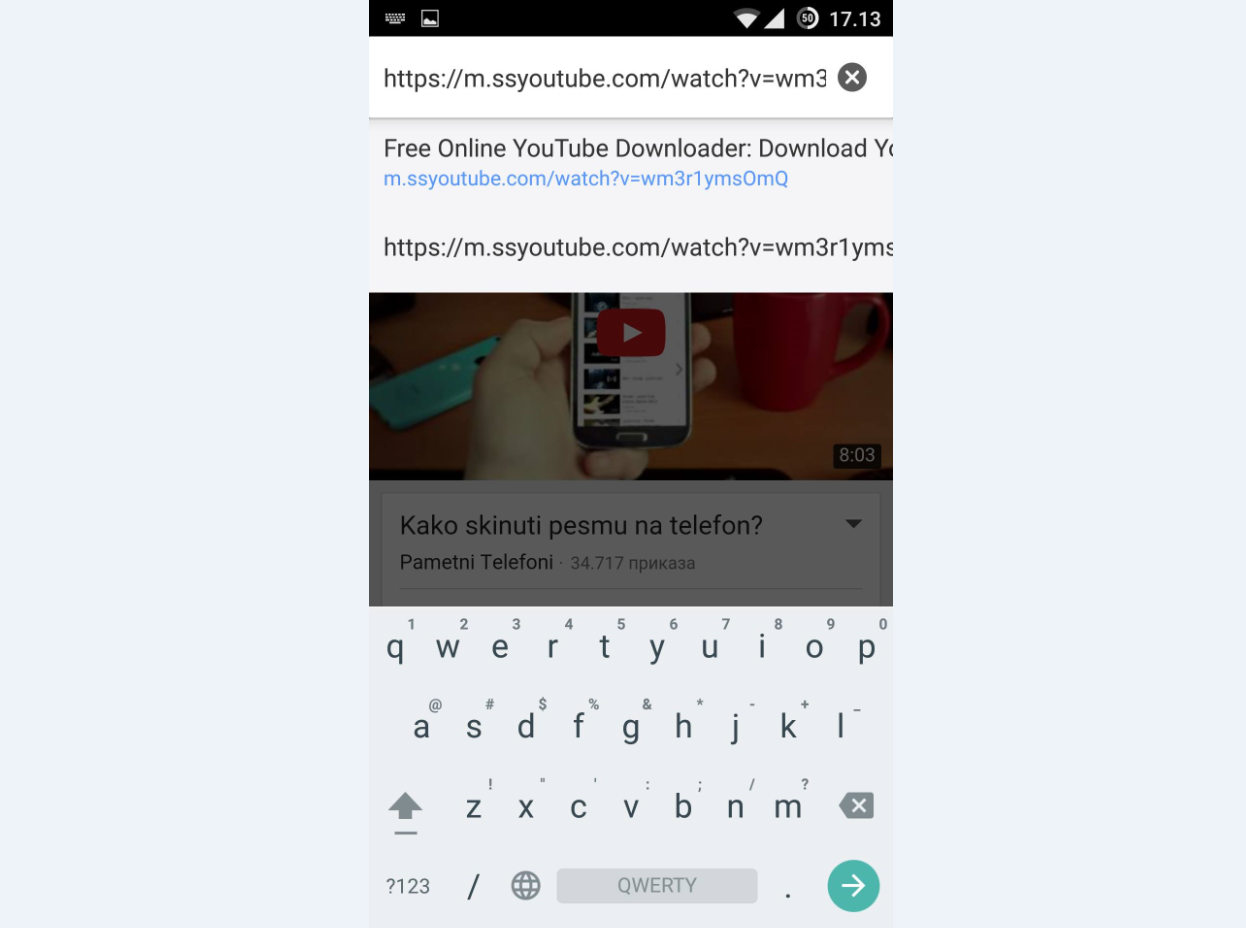
3. where the address enter YouTube site will have a link that leads to the video content which you just access. To begin the process of downloading it is necessary to modify the link and enter the two letter "ss" right in front "" https: // m. "So, after changing the link order of opportunities should look like this:

"Https://m.ssyoutube.com/watch?v=asdf193rkdk"


4. As soon as you're done is needed to confirm the changes to the arrow, enter, go or whatever the button to confirm the charge.

5. When the site is loaded in the beginning you will have "loadnig" animation just below the yellow "download" banner. Wait until the content from YouTube loaded.


7. When the loaded content from YouTube, listed one below the other show you the cover art of the video's name, the duration of the original link. Below that are offered download option so you can choose between formats:

FLV 240p
MP4 360p
MP4 480p
MP4 720p
MP4 1080p
WebM 360p
3GP 144p
3GP 240p
Audio MP4 128


8. As soon as you touch one of the available formats to download will be started.

* Note

This method can be used on any operating system.

We hope you succeed in its intention to download the video. If so, do not forget to share your experience and this article on your social networks.