Your phone can do much better with a little effort. Three ways to improve Android phone. All three require root and there is a chance it will not work on all devices. Applications in question can be found in the Google Play store.
Root your phone allows you to access system files and edit them. Nature, there is always the possibility that something goes wrong. So, you're doing it at your own risk!
If you do not have root phone click here
The first application to list the franco.Kernel updater - the kernel controls the hardware, ie, combines hardware with software. With this application you will be able to control much more. For example, you can to set up a maximum / minimum frequency at which the processor to work. However, if for some reason you do not want to play with this, you can apply one of several pre-installed profiles. You can adjust the color on the screen if you do not like the current, or turn on the screen to activate the double touch. Price applications is 5.48 dollars.
Next on the list is Lightflow. Allows you to change the notification light in any color if your device supports it. In addition, you can adjust the vibration or the bell. Price applications 2.49 dollars.
Last on the list is Titanium Backup . The application for backup of everything - applications, their data, the device settings ... Restoring the data is also very easy. Price for Pro version is 7.61 dollars, regular version is free.
Showing posts with label Root. Show all posts
Wednesday, 1 July 2015
Saturday, 23 May 2015
Root any Android device with Kingroot tool
If you own an Android smartphone or tablet, and to have a good chance, maybe you're thinking about how to root. Depending on the model, the manufacturer and your horoscope for the day, the process of root Android, can be smaller and more complicated. The universal root tool names KingRoot promises quick and easy solution for all, regardless of the model, the manufacturer and the stars.
Chinese KingRoot tool has already been a long time in the market but has not yet experienced a planetary popularity primarily because its interface was in Chinese. Now that he was finally translated into English Universal KingRoot imposes the ultimate root solution for all Android.
In order to function KingRoot not seeking special recovery, although it would be if you already getting into the whole story, to be your next step that you will make. This will allow testing the custom ROMs and various modes, which will make your Android, if not better, then certainly more his. Root will allow the use of cool and must have Android apps such as Titanium Backup and BetterBatteryStatsa and you uninstall the bloatware apps and potentially speed up your files.
Take a look at the video in which KingRoot successfully root just Galaxy S6, and if you decide to try this root solution to any of your Android, do so at your own risk.
Monday, 4 May 2015
How to "root" your phone?
See how to root your Android device caught by Kingo Root program in a few steps.
Root is a term used to express the modified state of Android devices. When the phone is root-ram, this means that the Android phone is unlocked and open to modification of system files. What are the benefits Root? More visible examples of the application with additional options that are available only if you have access to the root. Let's say you have a root-ram device, you can easily delete system applications that are not required.
Again, the question is "how to root your phone?" Initially, the root-ing was very complicated and there was no procedure in a few clicks. Root worked by advanced users of the Android platform, and in the beginning of the root was the trademark of programmers. Today, root is inevitable and it is a process that can be done even beginners. With the help of the program that is installed on the computer, users of Android without problems can root your phone.
Follow these steps to root your phone:
1. With this link download desktop application android_root click on the green button "download".
2. After clicking on the button "Download" will open a new page where the download will be started. Also, on this page you will have illustrated instruction on how to start the installation program "Kingo Root".
3. Double-start the installation without concern has come to an end clicks on the "Next" and "Install". As part of the installation are not conditioned by the toolbar-this or similar additional applications.
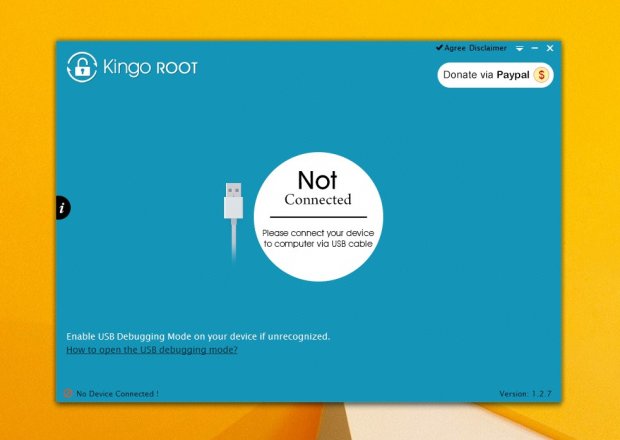
4.Start program to get you started root. On the home page you will notice that there is a notice in the lower left corner, which says it is necessary to have a check mark for the "USB debugging" ie. "USB debugging".
5. To activate this option, click on the attached link "how to open the USB debugging mode?" Under the "Kingo Root".
6. Connect your phone to the computer with a USB cable and wait for the computer downloads and installs the necessary drivers.
7. When connected, the driver installation and successful communication with a computer phone, "Kingo Root" will automatically switch to the next step which informs you that the root violates the guarantee but allows installation of recovery, the ROM and the applications that the root -RAM phones they have more options.
8. At the bottom of the window you have the "Root", click on it and start the root-ing.
9. When the "Kingo Root" complete its work there will appear the notice "Root Succeeded" button at the bottom and "Finish". Clicking on this button will reset the phone and so complete root
This is the simplest root that exists. This way you can root and tablet devices.
Labels:
Android,
Root,
Smartphone,
Tablet
Subscribe to:
Posts (Atom)